Standalone Indicator · v3.3
ST_TrendChannel
Multi Micro-Channel System · NinjaTrader 8

Auto-detecting trend channel system that draws live micro-channels on your chart, signals bounces off channel boundaries, flags midline crosses, and confirms breakouts — with a real-time WPF HUD showing channel state, strength, and position at a glance.

Any instrument Any timeframe Multi-channel WPF HUD Flash + Audio OnBarClose
ST_TRENDCHANNEL v3.3 :: MES 3-MIN
LIVE
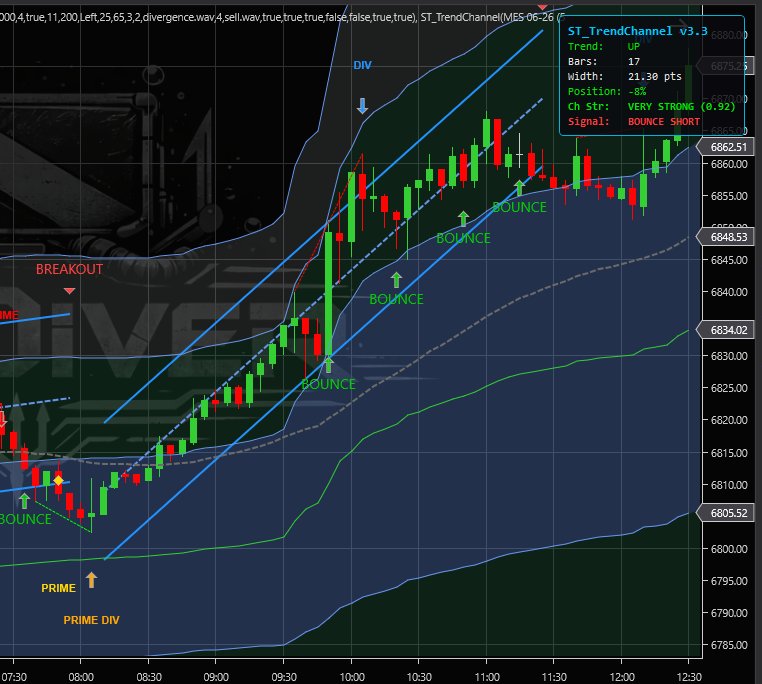
ST_TrendChannel v3.3 live on MES 3-min chart showing multiple channels, bounce signals, breakout, and HUD
Live session — multiple micro-channels with bounce signals, breakout confirmation, and the HUD panel showing channel strength, position, and signal state
Signal Types

Three Signal Categories

The indicator generates three distinct signal types, each marked directly on the chart with visual markers and optional alerts:

Bounce
Price tests a channel boundary and holds. Arrow marker at the band with "BOUNCE" label. Indicates the trend may be continuing within the channel structure.
Midline
Price crosses the channel midline in the direction of the prior signal. Diamond marker with "MIDLINE" label. A potential confirmation or target reference point.
Breakout
Confirmed channel exit — price moves convincingly beyond the boundary. Triangle marker with "BREAKOUT" label. The channel locks and a new one begins building.
On-Chart Display

Channel Visualization

Three lines are drawn directly on the price panel for the active channel: an upper band, a midline, and a lower band. These update in real time as the channel develops.

When a breakout is confirmed, the current channel freezes in place and remains visible as a historical reference. A new channel begins building after a brief cooldown. Up to 10 prior channels can remain visible simultaneously, giving traders a visual history of recent trend segments and how they resolved.

All signal markers (arrows, diamonds, triangles) are anchored to the channel bands with text labels pushed outside the channel to avoid visual clutter.

Heads-Up Display

Live HUD Panel

A WPF overlay panel provides a real-time summary of the active channel's state. Positions in any chart corner and updates every bar:

ST_TRENDCHANNEL v3.3
TrendUP
Bars47
Width18.50 pts
Position72%
Ch StrVERY STRONG
SignalBOUNCE LONG

Channel Strength rates how well price is respecting the active channel — displayed as a qualitative label: VERY STRONG, STRONG, MODERATE, WEAK, or VERY WEAK. Green indicates a strong, well-respected channel; red indicates a degrading one. Position shows where the current close sits within the channel (0% = lower band, 100% = upper band) and color-codes accordingly — green near the lower band, cyan in the middle, red near the upper. Signal shows the most recent signal state: BOUNCE LONG, BOUNCE SHORT, BREAKOUT, or FLAT.

Configuration

Parameter Reference

All parameters are accessible through the standard NinjaTrader 8 indicator properties panel. The indicator works well with defaults — adjust as needed for your instrument and timeframe.

CHANNEL PARAMETERS
Channel Period
Minimum bars before a channel becomes active
20
Dev Multiplier
Controls how wide the channel bands are drawn
2.0
Breakout Bars
Confirmation threshold before a breakout is recognized
2
Cooldown Bars
Pause after breakout before new channel starts
3
Max Visible
Historical channels kept on chart
10
Line Width
Pixel width of channel lines
2
SIGNAL PARAMETERS
Bounce Threshold
Ticks from band edge for bounce signal
4
Midline Signals
Enable midline cross signals
On
Signal Cooldown
Minimum bars between same-type signals
5
ALERT PARAMETERS
Enable Flash
Full-chart color flash on signals
On
Enable Audio
WAV audio alerts on signals
On
Flash Duration
Bars flash overlay remains visible
3
HUD Corner
Screen corner (TL / TR / BL / BR)
TR
Specs

Technical Details

ST_TRENDCHANNEL :: SPECS
PlatformNinjaTrader 8
Version3.3
TypePrice panel overlay
InstrumentsAny (futures, equities, forex, crypto)
TimeframesAny bar type
CalculationOnBarClose
HUDWPF overlay (configurable corner)
AlertsScreen flash + audio (independent toggle)
Suite ReqNone — fully standalone

Get Started

Inquire About This Indicator Download Product Slick