Standalone Tool · v2.2

FJNewsTicker

Live financial news headlines directly on your NinjaTrader 8 chart. Polls the free FinancialJuice RSS feed in the background and displays a scrollable, keyword-highlighted WPF panel — no API key, no external dependencies, no websocket. Just drop it on your chart and stay informed while you trade.

NinjaTrader 8
FinancialJuice RSS Feed
Zero Configuration Required
Standalone — No Suite Required
Overview

What It Does

A self-contained chart overlay that keeps you plugged into the macro news flow without ever leaving NinjaTrader. Headlines are color-coded by sentiment and tagged with age badges so you can judge relevance at a glance.

Real-Time Headlines

Fetches the FinancialJuice RSS feed on a configurable timer and displays the latest headlines directly on your chart in a compact WPF panel. New headlines flash the border and play an optional audio ping.

🎯 Keyword Intelligence

Headlines are automatically scanned against three keyword categories and color-coded in real time:

  • Bullish — rally, surge, jump, soar, buy, bullish, higher, gain, rise, rip
  • Bearish — crash, plunge, drop, sell, bearish, lower, fall, tank, dump, slump, tariff
  • Hot / Breaking — breaking, flash, alert, halt, fed, fomc, cpi, nfp, gdp, rate, missile, war, nuclear

🛡 Rate-Limit Resilience

Built-in 429 backoff logic. If the feed throttles you, the indicator silently extends its poll interval and keeps displaying cached headlines — no error popups, no missed data. Resets to normal once the feed recovers.

🔄 Instrument-Safe

Handles NinjaTrader's grid-rebuild on instrument switches. The panel detects when the chart grid changes and immediately reattaches itself with cached headlines — no waiting for the next poll cycle.

Live Preview

On-Chart HUD Panel

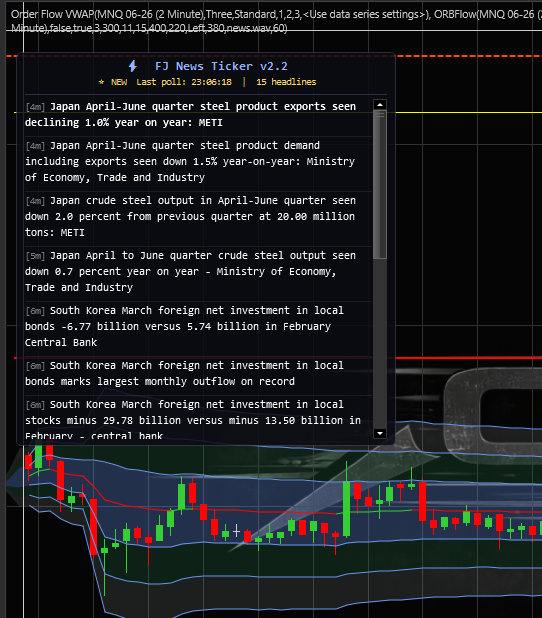
The FJNewsTicker renders a scrollable WPF overlay directly on your chart. Headlines display with age badges, sentiment coloring, and a ⚠ prefix for breaking/hot items.

FJNEWSTICKER :: LIVE ON MNQ 2-MIN
● LIVE
FJNewsTicker v2.2 live on NinjaTrader 8 chart showing FinancialJuice headlines with age badges and keyword highlighting
FJNewsTicker v2.2 — live on MNQ 2-minute chart with ORBFlow overlay
Architecture

How It Works

Dead simple under the hood — a single static HttpClient, a DispatcherTimer for polling, and standard WPF rendering on the chart grid. No threads to manage, no external DLLs.

01

Poll Feed

DispatcherTimer fires every N seconds. The shared HttpClient fetches the FinancialJuice RSS XML. On 429 response, backs off automatically.

02

Parse RSS

XmlDocument parses the XML. Extracts title, pubDate, and GUID for each item. Strips the "FinancialJuice:" prefix. Converts to local time.

03

Classify

Each headline is scanned against bull, bear, and hot keyword arrays. Color and badge are assigned. Age is computed relative to current time.

04

Render HUD

WPF StackPanel is rebuilt with new TextBlock inlines. Border flashes on new items. Audio ping fires. ScrollViewer auto-scrolls to top.

Classification

Keyword Categories

Headlines are color-coded in real time based on keyword matching. Three categories provide instant visual triage of the news feed.

▲ Bullish Keywords

rallysurgejump soarbuybullish highergainrise rip

▼ Bearish Keywords

crashplungedrop sellbearishlower falltankdump slumptariff

⚠ Hot / Breaking

breakingflashalert haltfedfomc cpinfpgdp ratemissilewar nuclear
Configuration

Full Parameter Reference

Every parameter is exposed in the NinjaTrader indicator properties panel. Sensible defaults are set — most traders won't need to change anything.

ParameterDefaultRangeDescription
FJ News | Settings
Poll Interval (sec)6010–300How often to fetch the RSS feed. Lower = more current, higher = less load.
Max Headlines155–50Maximum headlines displayed. Oldest drop off the bottom.
FJ News | Display
Panel Width380150–600Width of the news panel in pixels.
Panel Height400100–800Maximum height of the news panel.
Font Size108–16Font size for headline text (Consolas).
Panel Opacity22010–255Background alpha. 255 = fully opaque.
Panel PositionRightLeft / Center / RightWhich side of the chart to anchor the panel.
FJ News | Alerts
Enable Audio PingtruePlay a .wav sound when new headlines arrive.
Ping Sound Filenews.wavWAV file in NinjaTrader 8\sounds\ folder.
Enable HUD FlashtrueFlash the panel border + background on new headlines.
Flash Count31–10Number of on/off flash cycles.
Flash Speed (ms)300100–1000Duration of each flash pulse. Lower = faster.
Technical Specs

Under the Hood

Built for reliability during live market hours. Every edge case — rate limits, instrument switches, stale grids — is handled so the panel just works.

FJNEWSTICKER :: TECHNICAL SUMMARY
FEEDFinancialJuice RSS — free, no API key, no auth
TRANSPORTStatic HttpClient — one per AppDomain, reused across instances
PARSERXmlDocument — extracts title, pubDate, guid per item
TIMERDispatcherTimer — fires on UI thread, no cross-thread marshaling
BACKOFF429 detection → auto-doubles interval → caps at 300s → resets on success
HUDWPF Border → StackPanel → ScrollViewer — attached to chart Grid
RENDERINGFrozen SolidColorBrush instances — zero allocations per frame
FLASHFull-panel flash — border + background — configurable count & speed
AUDIOPlaySound via NinjaTrader 8\sounds\ — full path resolution
RESILIENCEStale grid detection → auto-reattach on instrument switch
OVERLAYIsOverlay = true — draws on price panel, IsHitTestVisible for scroll
CLEANUPFull disposal on State.Terminated — timer stop + HUD remove
Get FJNewsTicker

A standalone tool — no suite purchase required. Drop it on any NinjaTrader 8 chart and start seeing live financial headlines immediately.

Contact for Access ← All Indicators